ReceiptSplit is a free Splitwise alternative for iOS that scans receipts with AI, splits bills by individual items, and calculates tip and tax proportionally — with no account required. Splitwise locks receipt scanning behind a $40/year paywall and limits free users to 3-4 expenses per day; ReceiptSplit’s free tier includes 10 AI scans, unlimited manual entry, and no daily caps.
If you’re reading this, you’re probably frustrated with Splitwise. Maybe it’s the paywall that locks receipt scanning behind a $40/year subscription. Maybe it’s the daily expense limits on the free tier, or the unskippable ads with 10-second cooldown timers. Maybe you just want to scan a receipt and split it by item without creating an account first.
You’re not alone. Splitwise built something genuinely useful years ago, but the product has drifted. What was once a simple expense-splitting tool has become increasingly aggressive about pushing users toward its Pro subscription, and the free tier has gotten restrictive enough that many people are actively looking for alternatives.
I’ll be upfront: I built ReceiptSplit, so I’m biased. But I’ll also tell you where Splitwise is the better pick. Here’s the real breakdown.
Why People Are Leaving Splitwise
Splitwise has been around for over a decade and basically owned this category. But the free tier has gotten rough lately. Here’s what people are running into:
- Receipt scanning is locked behind a $40/year paywall. Splitwise’s Pro subscription costs $39.99/year (or $3.33/month). Free users can’t scan receipts at all. If you want to photograph a receipt and have the app parse the items, you’re paying up front.
- Daily expense limits on free accounts. Free Splitwise users are limited to adding roughly 3-4 expenses per day. Go over that, and the app forces you to wait until the next day or upgrade. For a group trip where you’re splitting multiple meals, transport, and activities in a single day, this is a dealbreaker.
- 10-second cooldown timers and unskippable ads. After certain actions on the free tier, Splitwise displays full-screen ads with a countdown timer. You can’t skip them. This turns a quick “log the dinner bill” into an exercise in patience.
- Receipt scanning is paywalled and lacks proportional splitting. Splitwise Pro can scan receipts and parse items, but the feature is locked behind the $40/year paywall — free users get nothing. And even with Pro, there’s no proportional tip or tax splitting based on what each person ordered.
- Account required for everyone. Both the person creating the expense and everyone in the group need Splitwise accounts. For a one-time dinner with someone you’ll never split a bill with again, that’s unnecessary friction.
- Reviews tell the story. As of early 2026, 65% of Splitwise’s Trustpilot reviews are 1-star. The complaints are mostly about monetization, features disappearing from the free tier, and difficulty deleting accounts.
To be clear: Splitwise isn’t bad. Millions of people use it for good reason. But the free tier keeps getting more restrictive, and if that’s bugging you, there are other options now.
ReceiptSplit vs Splitwise: Feature Comparison
Here’s what each app actually offers:
| Feature | ReceiptSplit | Splitwise |
|---|---|---|
| Receipt scanning | Free (10 AI scans) | Pro only ($40/yr) |
| Split by item | Yes (free) | Pro only ($40/yr) |
| Proportional tip & tax | Yes (automatic) | No |
| Account required | No | Yes |
| Payment methods | 8 (4 with payment links) | 2 (Venmo, PayPal) |
| Daily limits | None | 3-4/day on free |
| Data privacy | On-device, no tracking | Cloud sync, data collection |
| Offline support | Yes (manual entry) | Partial |
| Price | Free + Pro subscription | Free + Pro ($4.99/mo or $39.99/yr) |
Now let me explain where each one is actually better.
Where ReceiptSplit Wins
ReceiptSplit was built for a specific scenario that Splitwise handles poorly: you have a physical receipt, and you want to split it fairly by what each person actually ordered. Here’s where it pulls ahead.
Item-Level Splitting with AI Scanning
This is the core difference. When you scan a receipt with ReceiptSplit, the app uses AI-powered OCR to read every line item, quantity, and price. Then you tap to assign each item to the person (or people) who ordered it. Shared an appetizer? Tap both names. Someone had two drinks? They’re already listed as separate line items.
Splitwise Pro can scan receipts and parse items, but the feature is locked behind a $40/year paywall — free users can’t scan at all. And even with Pro, there’s no proportional tip or tax distribution. ReceiptSplit includes 10 free AI scans and automatically splits tip and tax based on what each person ordered. For a group of six with wildly different orders, that proportional calculation makes a real difference.
Proportional Tip and Tax
This is a feature most people don’t realize they need until they see it. When you split a bill by item, the question becomes: how do you divide the tip and tax? Most apps either split them equally (unfair to lighter eaters) or make you do the math yourself.
ReceiptSplit calculates each person’s share of tip and tax proportionally to their food order. If you ordered 25% of the food, you pay 25% of the tip and 25% of the tax. Set the tip percentage and the app does the rest. At a table of six where orders range from $12 to $45, this makes a real difference. You can try the math yourself with our free tip calculator, or read more in our guide on how to split a restaurant bill fairly.
No Account, No Signup, Privacy-First
ReceiptSplit doesn’t require an account. Download it, open it, scan your first receipt. There’s no email verification, no profile creation, no social graph.
For AI scanning, receipt images are sent through a secure proxy for processing — but they’re never stored on any server and never used for analytics. Your spending history, who you split with, and all your data stays on your device. No ads, no data sold. For a one-time dinner with someone you’ll never split a bill with again, this zero-friction approach beats creating yet another account.
8 Payment Methods
ReceiptSplit supports 8 payment methods: Venmo, PayPal, Cash App, Revolut, Apple Pay, BLIK, bank transfer, and cash tracking. For Venmo, PayPal, and Cash App, payment requests include web links pre-filled with the exact amount owed — the recipient taps and confirms. Revolut links to the user’s profile. The remaining methods are tracked in-app so you always know who’s settled up. Splitwise supports Venmo and PayPal, but ReceiptSplit’s broader coverage means you’re more likely to match however your group prefers to pay.
PDF Export and Multi-Channel Sharing
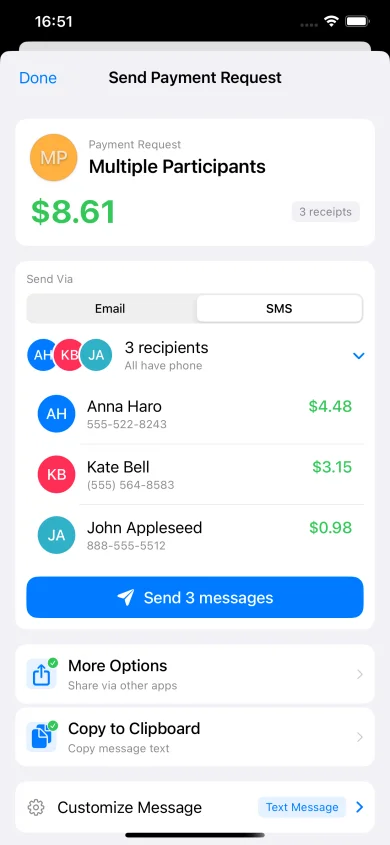
ReceiptSplit generates itemized breakdowns you can share via iMessage, email, WhatsApp, or export as PDF. Each person sees what they ordered, their share of tip and tax, and what they owe. No more “wait, what was my share again?” texts the next morning.
Where Splitwise Still Wins
Splitwise is genuinely better for some things. No point pretending otherwise.
Ongoing Group Expense Tracking
If you have roommates and need to track rent, utilities, groceries, and shared household expenses over months, Splitwise is purpose-built for this. It maintains running balances between group members, so you can settle up periodically rather than after every transaction. ReceiptSplit is designed for individual receipt splitting — it’s not trying to be a long-term ledger.
Cross-Platform Support
Splitwise works on iOS, Android, and the web. If your group includes Android users, they can’t use ReceiptSplit (iOS only, for now). For mixed-platform friend groups, Splitwise’s universal availability is a genuine advantage. ReceiptSplit works around this by letting you share results via SMS, email, or any messaging app — but the scanning and splitting itself requires an iPhone.
Debt Simplification Across Multiple Expenses
Here’s where Splitwise’s architecture really shines. Say you’re on a week-long trip with four friends and you log 20 expenses. Instead of settling each one individually, Splitwise calculates the minimum number of payments needed to make everyone whole. Person A owes Person B $45 net, Person C owes Person D $12, done. It’s mathematically optimal and saves everyone the hassle of a dozen small transfers. ReceiptSplit handles individual receipts well, but it doesn’t aggregate debts across multiple bills.
Larger User Base
Splitwise has millions of active users. When you tell your friends “let’s use Splitwise,” there’s a good chance some of them already have it installed. Network effects matter for shared tools. ReceiptSplit is newer and growing, but it doesn’t yet have the same install base. That said, ReceiptSplit doesn’t require your friends to install anything — you just send them their total.
Which One Should You Use?
The answer depends on what you’re actually splitting and how often.
Use ReceiptSplit for:
- Restaurant dinners where everyone ordered different things and you want to split by item
- One-time splits with people you won’t regularly share expenses with
- Travel receipts where you want a clear record of who owes what for each meal or purchase
- Any situation where fairness per item matters — especially when there’s a big range between the cheapest and most expensive orders
- Privacy-conscious users who don’t want another account or cloud-synced spending data
Use Splitwise for:
- Long-term roommate expense tracking with ongoing monthly costs
- Cross-platform groups where Android users need to participate actively
- Extended trips with many shared expenses that you want to settle up at the end
- Large groups where debt simplification across many transactions saves real time
You can use both. ReceiptSplit for restaurant bills where you want item-level fairness. Splitwise for monthly roommate stuff. They don’t really overlap.
For a broader look at bill splitting options on iOS, check out our roundup of the best bill splitting apps for iPhone.
How to Switch from Splitwise
If you’ve decided to try ReceiptSplit for your receipt-splitting needs, here’s how to get started. The transition is painless because there’s nothing to migrate for per-receipt splitting.
- Download ReceiptSplit. It’s free on the App Store. No account creation, no email, no signup. Open the app and you’re ready to go.
- Use it for your next dinner. The next time you’re at a restaurant with friends, scan the receipt instead of opening Splitwise. You’ll see every line item parsed automatically. Assign items to people, set the tip, and send everyone their total in under 30 seconds.
- Keep Splitwise for existing groups if needed. If you have active Splitwise groups with running balances (roommates, ongoing trips), there’s no reason to disrupt those. Let ReceiptSplit handle individual meals and receipts, and let Splitwise handle the long-term ledger. They coexist comfortably.
You don’t have to go all-or-nothing. Most Splitwise frustration is about receipt splitting specifically — the paywall, no item assignment, daily limits. ReceiptSplit handles that part. Keep Splitwise for whatever else it does well for you.
Frequently Asked Questions
Is ReceiptSplit really free?
Yes. You get 10 free AI-powered receipt scans, which use OCR and machine learning to parse every line item from a photo of your receipt. After that, a Pro subscription unlocks unlimited scans — see the App Store for current pricing. Manual entry — where you type in items yourself — is always free with no limits. There are no ads, no cooldown timers, and no daily caps on any tier.
Can I import my Splitwise data into ReceiptSplit?
Not yet, but it’s on the roadmap. ReceiptSplit and Splitwise serve different purposes — ReceiptSplit focuses on per-receipt splitting rather than ongoing group balances — so a direct import isn’t always necessary. For most users, the transition is simply using ReceiptSplit for new receipts going forward while keeping Splitwise for any existing group balances that haven’t been settled yet.
Does ReceiptSplit work on Android?
ReceiptSplit is currently iOS only (iPhone and iPad). An Android version isn’t available yet. However, you don’t need the app to receive a split — ReceiptSplit sends payment requests via text, email, or any messaging app, so your Android-using friends can still see their itemized breakdown and pay through whichever payment service they prefer.
Is my data private with ReceiptSplit?
Yes. There’s no account, so there’s no profile to build. For AI scanning, receipt images are sent through a secure proxy for processing but are never stored on any server. Your spending history, split details, and all app data stays on your device. No ads, no tracking, no data sold. You can read the full privacy policy for details.
Split receipts fairly. No account needed.
ReceiptSplit scans your receipt, assigns items to each person, and calculates proportional tip and tax automatically.
Download Free on the App Store